
Market
market
Scale
The most important tools for selling digital items are a sales page builder, checkout system, payment processor, digital delivery method, email marketing system, customer management setup, support channel, and analytics. The exact stack depends on what you sell, but every digital-product business needs a clear path from discovery to purchase to delivery.
The mistake is thinking the product file is the business. It is not. The business is the system around the file: how people find it, understand it, buy it, receive it, use it, ask questions, and hear from you again.
That is why tool choice matters. A creator selling a simple PDF template may need a lighter setup than a coach selling a course, membership, workshop replay, or digital bundle. But both need the same basic logic: a buyer should know what they are buying, pay without confusion, receive access quickly, and get a useful next step after purchase.
Kartra fits this topic because selling digital items usually involves more than checkout alone. Kartra’s broader feature page positions the platform around landing pages, email marketing, automation, memberships, and checkouts, while its shopping cart page focuses on checkout capabilities for selling online.
To sell digital items, you need tools that handle offer presentation, payment, delivery, follow-up, customer support, and performance tracking. A simple setup can still work, but each part of the buyer journey needs to be accounted for.
A digital item can be a downloadable file, template, workbook, online course, private podcast, paid workshop replay, software asset, design pack, coaching resource, membership, or bundle. The more complex the item, the more important the surrounding system becomes.
A downloadable checklist might only need a sales page, checkout, file delivery, and a receipt email. A course may need a sales page, checkout, protected access, onboarding emails, support, progress tracking, and future upgrade offers. A membership may need recurring billing, access levels, content pacing, renewal communication, and cancellation handling.
The tool stack should follow the customer journey. Start with the buyer’s path, then choose tools that support that path.
Most creators do the reverse. They choose tools first, then force the business into whatever those tools make easy.
A sales page is the tool that explains the digital item before someone reaches checkout. It should define the buyer, the problem, the promise, what is included, who it is for, who it is not for, and what happens after purchase.
For digital items, the sales page has to work harder than many creators expect. Buyers cannot touch the product. They cannot inspect the finished template, course, or resource in the same way they might inspect a physical item. The page has to make the value visible.
A good sales page does not simply list features. It explains the use case.
A template seller might show the situation where the template is useful. A course creator might show the outcome students are working toward. A membership owner might explain why the value continues over time. A consultant selling a paid toolkit might show how the resource fits into a bigger process.
Kartra’s sales funnel software page is relevant here because it describes planning funnel paths that connect landing pages, email automation, and checkout pages. That matters when the sales page is only one step in a larger digital-product funnel.
A product-led next step fits naturally at this stage: if your digital item needs more than a standalone checkout link, review Kartra’s sales funnel software alongside your offer map. The goal is not to build a complicated funnel. The goal is to make sure the buyer has enough context before payment.
Checkout is where the buyer confirms the decision, but it should not be the first place they understand the offer. By the time someone reaches checkout, the product name, price, terms, delivery method, and next step should already be clear.
A digital-item checkout tool should support the way you sell. A one-time purchase needs a clean payment flow. A digital bundle may need order details and post-purchase delivery instructions. A course may need checkout connected to content access. A membership may need recurring payment logic. A coaching toolkit may need an order form that gathers useful buyer information.
Kartra’s shopping cart software page discusses checkout functionality, including digital checkout use cases, checkout forms, payments, and customer information collection. It also references tax and VAT handling on the current page, which is the type of detail sellers should verify directly before relying on it for a specific business setup.
This is where many digital-product businesses lose trust. The sales page says one thing. The checkout says another. The receipt email is vague. The buyer does not know when access arrives.
Checkout should feel boring in the best possible way. Clear product. Clear price. Clear terms. Clear next step.
Digital delivery is the moment where the buyer receives what they purchased. It can happen through a download link, protected content area, course portal, membership access, email attachment, customer dashboard, or private resource page.
The right delivery method depends on the item. A PDF planner may only need a secure delivery link and a follow-up email. A paid course needs a structured content area. A workshop replay may need a replay page with related resources. A template library may need an organized portal. A membership needs ongoing access and clear navigation.
Delivery should never feel like an afterthought. It is the first proof that the purchase was handled professionally.
For courses and memberships, Kartra has feature pages related to online course delivery and membership sites. Its online course platform page describes course creation, marketing, and selling in the context of connected digital marketing tools, while its archived membership page discusses selling courses and digital products alongside memberships and related tools.
A natural product-led CTA belongs here: if your digital item is more than a file, compare the delivery experience against Kartra’s online course platform and membership-site capabilities before deciding whether a simple download tool is enough.
Email is one of the most important tools for selling digital items because many buyers do not purchase the first time they see an offer. They may need examples, reminders, education, objection handling, or a clearer explanation of how the product fits their situation.
Email also matters after the sale. A buyer may need access instructions, a first-step email, usage tips, support guidance, upgrade options, renewal reminders, or related product recommendations.
This is where email stops being a newsletter tool and becomes part of the product experience.
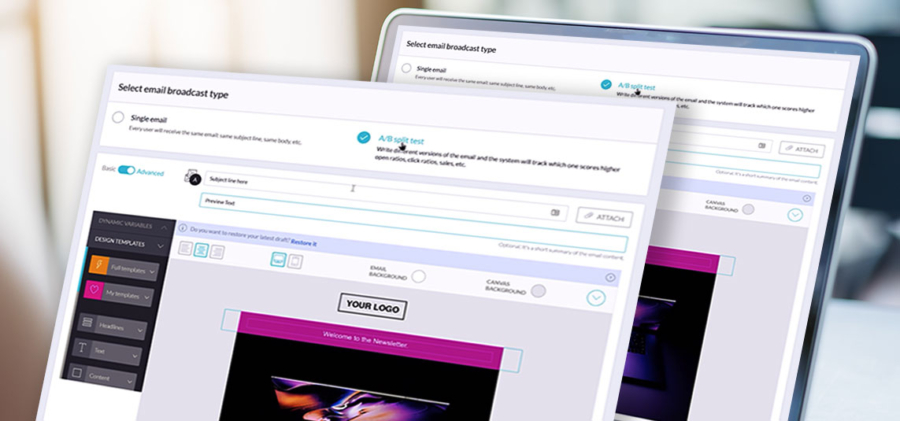
Kartra’s email automation software page positions email automation around campaigns, autoresponders, sequences, tags, lists, behavioral automation, and customer journeys. Because current plan details and limits can change, sellers should verify the live page before making feature or pricing decisions.
For a simple digital item, the email sequence may be short. A lead magnet introduces the problem. A nurture email explains the product. A sales email points to the offer. A receipt or onboarding email delivers the next step after purchase.
For a more involved product, email becomes more strategic. A course buyer might need a welcome sequence. A membership buyer might need re-engagement emails. A bundle buyer might need help deciding which resource to use first.
The blunt rule: do not sell a digital item and disappear.
Lead capture gives you a way to follow up with people who are interested but not ready to buy. For digital-product sellers, this is often the difference between a one-page offer and a real selling system.
A lead capture tool might support an opt-in page, embedded form, quiz, waitlist, free sample, discount request, launch notification, or resource preview. The purpose is not to collect emails for the sake of collecting emails. The purpose is to route interested people into a relevant follow-up path.
A template seller might offer a free sample template. A course creator might offer a checklist. A designer selling presets might offer a free mini-pack. A consultant selling a paid toolkit might offer a diagnostic worksheet. The free asset should naturally lead to the paid item.
Kartra’s form builder page describes forms that can be placed within pages, videos, or websites, while its lead management page discusses tracking lead sources and engagement behavior. Those pages are relevant because lead capture is not only about the form itself; it is about what happens to the lead after the form is submitted.
Authority routing matters here. A reader who is thinking about lead capture should not be sent only to checkout. They should be routed to form building, lead management, email automation, and sales funnel pages because those tools work together in the selling process.
Customer management is easy to ignore when you have a few buyers. It becomes painful when you need to know who bought what, who requested support, who clicked which offer, who should receive an upgrade email, or who should not receive a promotion because they already purchased.
A digital-product customer management setup should help you separate leads, buyers, repeat buyers, members, affiliates, and support contacts. It should also help you avoid sending the wrong message to the wrong person.
This is where tags, lists, segments, customer records, and purchase history become useful. They are not exciting, but they prevent sloppy follow-up.

Kartra’s approved workflow guidance allows content to discuss contacts, lists, tags, forms, email sequences, automation, products, checkout, and post-purchase delivery as connected parts of the online-business process. The point is not to create a complicated tagging system. The point is to create enough structure that your sales and support process stays understandable.
A simple digital-product business might need only a few useful categories: leads, buyers, product-specific customers, refund or cancellation contacts where relevant, and people interested in related offers. Too many tags create maintenance work. Too few create confusion.
Automation can help digital-product sellers send welcome emails, deliver resources, follow up with interested leads, tag buyers, remove purchasers from promotional sequences, invite customers to related offers, or route support instructions after purchase.
But automation does not fix an unclear strategy. It makes the strategy run faster.
Before adding automation, write the buyer journey in plain language. Someone opts in. They receive the free resource. They get an educational email. They see the paid offer. If they buy, they receive access and onboarding. If they do not buy, they receive a different follow-up. If they buy a starter product, they may later be invited to a course, membership, or higher-value offer.
That is enough to build from.
Kartra’s feature page positions automation as part of a broader platform that includes pages, email marketing, memberships, and checkouts. Its sales funnel page also connects funnel planning with landing pages, email automation, and checkout pages.
A product-led CTA here should stay practical: if your selling process already includes lead capture, checkout, delivery, and follow-up, use Kartra to map those steps before building automation. Automation is most useful when the customer path is already clear.
Digital products still create support needs. Buyers lose access links. They ask whether the product fits their situation. They need help logging in. They cannot find a file. They misunderstand what is included. They want to know whether updates are included.
Support is part of the product experience, even for low-cost digital items.
A basic support setup might include a support email address and a short FAQ. A more developed setup might include a helpdesk, ticketing, saved replies, knowledge resources, or product-specific support instructions.
Kartra has a helpdesk software page, and its broader feature page includes helpdesks as part of the platform’s feature set. Sellers should verify current functionality and plan fit directly before building a support process around any specific feature.
Support boundaries should be clear before purchase when they affect the offer. A template may include setup instructions but not personal customization. A course may include comments but not private coaching. A membership may include office hours but not unlimited direct messages.
Support clarity protects both sides.
Analytics tools help digital-product sellers understand where buyers come from, which pages they visit, where they drop off, and which offers need improvement. The goal is not to stare at dashboards. The goal is to make better decisions.
For a digital item, useful questions include whether visitors understand the sales page, whether checkout is creating friction, whether email follow-up is sending people back to the offer, whether buyers access the product after purchase, and whether certain traffic sources produce better customers.
Kartra’s marketing analytics page discusses campaign and sales funnel insights, while its sales funnel software page references tracking performance across funnel steps. These are relevant for digital-product sellers who need to evaluate more than one page at a time.
The conventional mistake is treating analytics as a scoreboard. It is better to treat analytics as a diagnostic tool. If traffic is high and sales are low, the issue may be the offer, sales page, audience match, checkout clarity, or price. If sales are happening but support questions are high, the issue may be delivery or onboarding.
One metric rarely tells the whole story.
Affiliate tools are useful when other people will promote your digital items for a commission or partner reward. They are not necessary for every seller, and they should not be added before the core offer is clear.
An affiliate setup can make sense for courses, memberships, templates, coaching resources, software assets, or digital bundles when the seller has a clear product, clear commission terms, and enough tracking to manage referrals. The offer still has to convert. Affiliates cannot fix a weak sales page or unclear product promise.
Kartra’s affiliate management page says Kartra can be used to create and run affiliate programs for products and lead generation, with plan availability noted on the page. Because plan access can change, verify current requirements before choosing a platform for affiliate management.
A good affiliate tool should support the business process without adding chaos. You need clear promotional rules, commission logic, partner communication, and a way to see what is happening. Otherwise, the affiliate program becomes another unsupported project.
Imagine a consultant selling a digital template bundle called “Client Onboarding Kit for Solo Consultants.” The bundle includes an intake form template, welcome email script, kickoff checklist, project timeline template, and client handoff guide.
The weak setup is simple but fragile. The consultant posts a checkout link on social media, sends buyers a file link manually, and answers the same support questions by email. That can work for a few sales, but it gets messy quickly.
A stronger setup starts with a focused sales page. The page explains who the kit is for, what problem it solves, what is included, how to use it, and what happens after purchase. The offer is not “five templates.” The offer is a cleaner client onboarding process.
Before the sale, the consultant offers a free “Client Onboarding Checklist” through an opt-in form. New leads receive a short email sequence that explains the common mistakes in onboarding and introduces the paid kit. Interested buyers click through to the sales page.
At checkout, the buyer sees the product name, price, and delivery terms clearly. After payment, they receive an email with access instructions and a suggested first step. If the consultant also sells coaching, buyers of the kit can later receive an email about a deeper implementation offer, but only if the message fits their purchase behavior.
If this were built in Kartra, the relevant tool path would include a landing page, form, email sequence, sales page, checkout, digital delivery or protected access, customer tagging, and support instructions. That aligns with Kartra’s product positioning around connected lead capture, nurturing, checkout, content delivery, and customer follow-up.
That is the difference between selling a file and building a digital-product system.
The most common mistake is choosing the cheapest tool without considering the full buyer journey. A low-cost checkout link may be fine for a small test, but it may not support the delivery, follow-up, support, or segmentation you need later.
Another mistake is buying too many tools too early. A creator may sign up for a landing page builder, email platform, checkout app, course host, analytics tool, file delivery tool, helpdesk, and affiliate system before the offer is even validated. Tool sprawl can create more problems than it solves.
A third mistake is treating delivery as separate from sales. The buyer’s experience after purchase affects trust. If access is confusing, onboarding is weak, or support instructions are missing, the product feels less professional even if the content itself is useful.
The final mistake is automating a messy process. If you do not know who should receive which message and why, automation will not clarify it. It will only send unclear messages more efficiently.
Before choosing tools, define the digital item, the buyer, the sales promise, the purchase terms, the delivery method, and the follow-up path. Decide whether the product is a simple download, a course, a membership, a bundle, a workshop replay, or a supported program. Map how someone discovers the item, joins your list, reads the offer, pays, receives access, asks for help, and hears from you again.
Then choose tools that support that path. You may need a landing page, opt-in form, email automation, checkout, payment processor, delivery area, customer records, support system, analytics, and affiliate management. You may not need all of them on day one.
The right stack is the one that keeps the buyer journey clear and the business manageable.
You need a way to present the offer, accept payment, deliver the product, follow up by email, manage customers, provide support, and track performance. For a simple download, the setup can be light. For a course, membership, or digital bundle, the tool stack usually needs to be more connected.
The best platform depends on what you sell and how complex the customer journey is. A simple file may only need checkout and delivery. A course, membership, or digital-product funnel may need landing pages, forms, email automation, checkout, protected access, support, and analytics working together.
Kartra can support digital-product selling workflows that include pages, checkout, email follow-up, customer management, and delivery-related processes. For current feature details, review Kartra’s shopping cart, online course platform, membership sites, and broader features pages before choosing a setup.
You can sell without email marketing, but email gives you a way to follow up with people who are interested but not ready to buy. It also helps after purchase by delivering access instructions, onboarding guidance, usage tips, and related offers.
A marketplace can provide built-in discovery, but it may limit how much control you have over branding, customer relationships, checkout experience, and follow-up. Selling through your own site or platform gives you more control over the buyer journey, but you are responsible for traffic and conversion.
Digital products can be delivered through a secure download link, email, protected page, customer portal, course area, membership site, or resource library. The right method depends on whether the item is a simple file, a structured course, an ongoing membership, or a larger digital bundle.
The tools for selling digital items should support the full buyer journey, not just the payment moment. A digital-product business needs a clear offer, a sales page, checkout, delivery, email follow-up, customer management, support, and analytics. Some sellers can start with a simple setup. Others need a connected platform from the beginning.
Start with the item. Map the buyer journey. Decide what needs to happen before purchase, during checkout, and after delivery. Then choose tools that make that journey easier to manage.
If your digital-product business needs a connected path from lead capture to sales page, checkout, delivery, follow-up, and support, Kartra is built around that type of online business process. Start with Kartra’s shopping cart software, then route readers who need a fuller sales setup to sales funnel software, email automation software, online course platform, membership sites, and the broader Kartra features page as their digital-product system becomes more complete.